
Key Takeaways
- Internal linking tools find link opportunities, audit site structure, and automate insertion. They don't build authority — they redistribute the authority you already have.
- Most tools are WordPress-only plugins. If you're on Shopify, Webflow, or a custom CMS, your options narrow to multi-CMS SaaS platforms.
- Our top picks: Link Whisper for WordPress sites under 1,000 pages, LinkBoss for multi-CMS sites needing bulk automation, Ahrefs Site Audit if you already pay for it.
- Small sites under 100 pages can do internal linking manually in an afternoon. The tool ROI requires content volume.
What Internal Linking Tools Actually Do
Internal linking tools do three things: surface missed linking opportunities across your existing content, audit your site's structure for orphan pages and weak link distribution, and automate the actual insertion of links so you're not editing 200 posts by hand.
That third function is where most of the value sits. A 500-post WordPress blog has roughly 250,000 possible internal link pairs. No human is going to find the relevant ones manually. Tools do this in minutes.
Google's John Mueller has called internal linking one of the most impactful actions a site owner can take to direct Google toward the pages that matter most — and the framing has held up across multiple Search Central updates since. The argument for using a tool isn't that internal linking is more important than it used to be. It's that the bigger your site gets, the harder the manual version becomes.
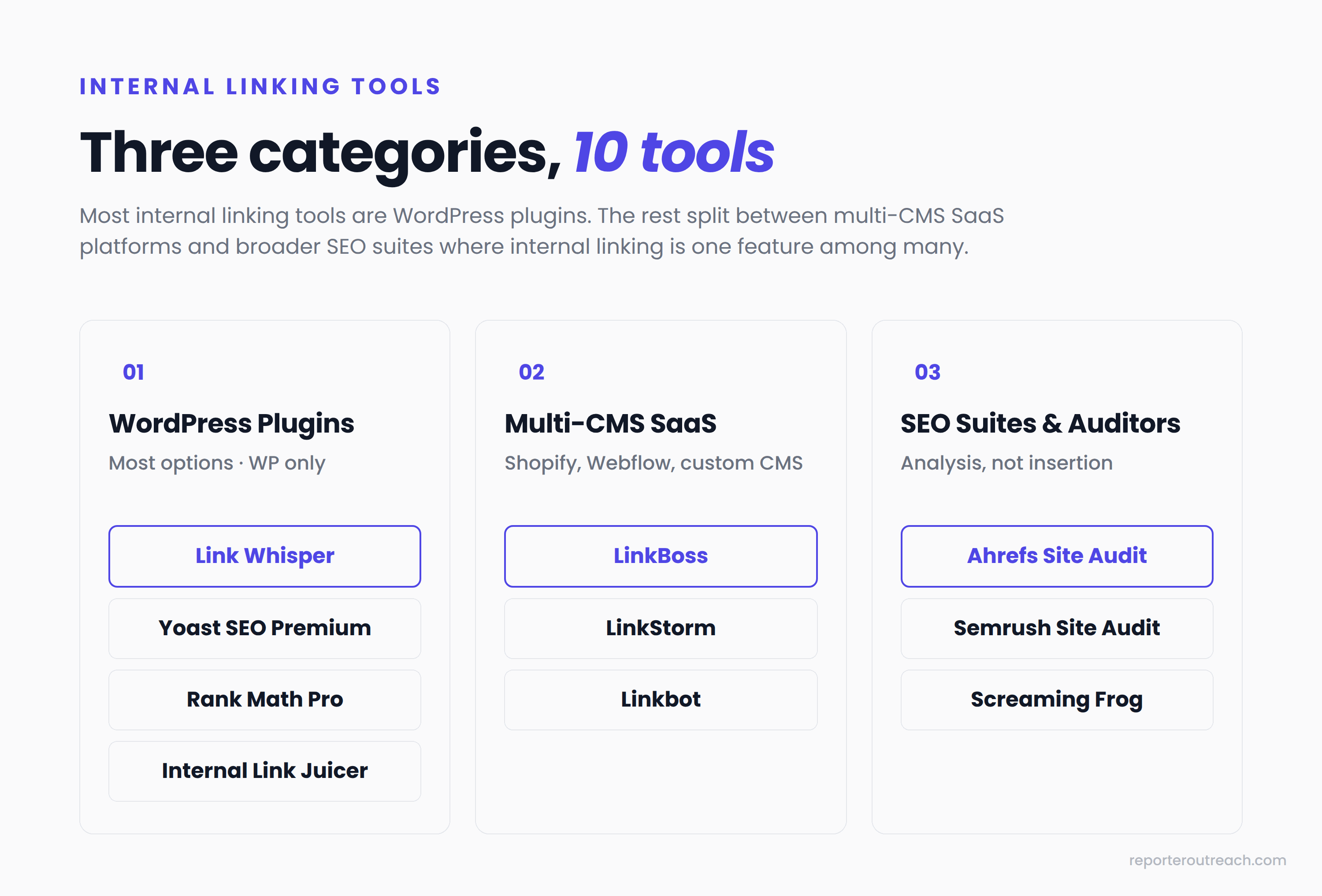
Internal linking tools fall into three categories: WordPress plugins (the largest group by far, since WordPress runs about 43% of all websites), multi-CMS SaaS platforms that work across WordPress, Shopify, Webflow, and custom builds, and broader SEO suites where internal linking is one feature among many. The right pick depends mostly on your platform and content volume.
The 10 Best Internal Linking Tools (Ranked)
We ranked these for the typical SEO managing 100–1,000 pages of content on WordPress, with notes on where each tool fits if your situation is different. Solo bloggers with under 100 posts and enterprise sites running 50,000+ URLs have different best-fit picks — see the "How to Choose" section after the rankings.
01.Link Whisper
Best for: WordPress blogs and content sites under 1,000 posts.
Pricing: $97/yr (1 site), scaling to $497/yr (50 sites).
The default pick for WordPress. Link Whisper sits inside your editor and surfaces relevant internal link suggestions as you write or edit posts. The AI is genuinely useful for finding contextual placements you'd miss scanning manually. The orphan content report and broken link checker are bundled in.
What we like: Fast time-to-value (install, activate, suggestions populate within minutes), GSC integration, and an Auto-Linking feature for keyword-to-URL rules.
Limitations: WordPress only — the Shopify version exists but reviews are mixed. The annual subscription model means you pay every year (the older lifetime license has been retired).
02.LinkBoss
Best for: Multi-CMS sites and large content libraries needing bulk interlinking.
Pricing: Free tier (50 credits on signup); paid tiers credit-based, starting around $50/yr.
The strongest pick if you're not on WordPress or you're managing more posts than a plugin can handle. LinkBoss runs as a SaaS, supports WordPress and Shopify natively, and uses semantic analysis (vector embeddings) to find contextually relevant link pairs rather than keyword matches.
What we like: Bulk interlinking up to 2,000 links in one operation, GSC-powered rank tracking integrated with the linking workflow, and a free trial that doesn't require a credit card.
Limitations: Credit-based pricing requires forecasting your monthly link volume. Higher-tier plans get expensive for very large sites.
03.LinkStorm
Best for: Mid-size sites where GSC data should drive link decisions.
Pricing: $30/mo (Small), $60/mo (Medium), $120/mo (Large) — annual discount available.
LinkStorm is the alternative to LinkBoss if you prefer subscription pricing over credits. It works on any CMS, integrates with Google Search Console for ranking-aware suggestions, and offers an auto-link feature that adds relevant links across your site without manual approval.
What we like: Clean GSC integration that prioritizes pages already getting traffic, broken link detection across internal and external links, and unlimited websites on every plan (only URL count varies).
Limitations: Pricier than WordPress plugins for small sites. The auto-link feature can create duplicate links if not configured carefully.
04.Yoast SEO Premium
Best for: Sites already using Yoast that want internal linking as part of a broader SEO suite.
Pricing: $119/yr.
Yoast Premium includes internal linking suggestions alongside its full feature set: redirects, content insights, schema, social previews, and the rest. If you're already paying for Yoast, the internal linking module is bundled value rather than a standalone purchase decision.
What we like: No new tool to learn if you're already a Yoast user. Suggestions appear inline while you write.
Limitations: Suggestion quality is weaker than dedicated tools like Link Whisper or LinkBoss. No bulk operation — every link is added one at a time. WordPress only.
05.Ahrefs Site Audit
Best for: Teams already using Ahrefs who need internal link analysis as part of a broader audit.
Pricing: Starter $29/mo, Lite $129/mo, Standard $249/mo.
Ahrefs isn't an internal linking tool in the dedicated-plugin sense — it's a broader SEO platform whose Site Audit module includes a strong Internal Backlinks report. You see which pages have the most internal links, which are orphaned, anchor text distribution, and link opportunity suggestions based on keyword and content matching.
What we like: Same dataset that powers your external backlink analysis, link opportunity suggestions tied to actual keyword research, and the Internal Link Opportunities report that surfaces relevant link placements across your site.
Limitations: No automated insertion — you still implement the links yourself in your CMS. Overkill if internal linking is your only SEO need.
06.Semrush Site Audit
Best for: Teams already using Semrush.
Pricing: Pro $139.95/mo, Guru $249.95/mo, Business $449.95/mo.
Semrush's Site Audit has an internal linking module that flags overlinked pages, underlinked pages, broken internal links, and orphan pages. The reporting is strong, especially on larger sites where you need filterable views of link distribution.
What we like: Comprehensive audit beyond just internal linking — broken links, redirect chains, crawl depth issues all in one report. Good visualization of internal link distribution across your site.
Limitations: Most expensive option on this list at the entry tier. Same caveat as Ahrefs — analysis only, no automated link insertion.
07.Rank Math Pro
Best for: WordPress users wanting a Yoast alternative.
Pricing: Starts at $59/yr.
Rank Math is the most credible Yoast competitor, with a similar bundled-suite approach. The internal linking module suggests relevant links as you write, and the broader SEO feature set covers schema, redirects, sitemap configuration, and content analysis.
What we like: Lighter footprint than Yoast, often faster on the WordPress backend. Internal linking suggestions are decent.
Limitations: Internal linking is a secondary feature here — dedicated tools find more opportunities and handle bulk operations. WordPress only.
08.Internal Link Juicer
Best for: WordPress users on a budget who want keyword-based automation.
Pricing: Free version available; Premium $70/yr (1 site), $150/yr (5 sites), $190/yr (10 sites).
Internal Link Juicer takes a different approach than the AI tools above. You define seed keywords for each post (e.g., "PageRank," "link equity"), and the plugin automatically inserts links wherever those keywords appear across your site. It's keyword-matching, not semantic understanding.
What we like: Cheap entry point with a free version, fast setup, and predictable behavior — you tell it what to link, it links it.
Limitations: Keyword matching produces less contextually relevant links than AI-based tools. Heavy automation can create awkward placements if you don't configure exclusion rules carefully.
09.Screaming Frog
Best for: Manual auditing on any platform.
Pricing: Free up to 500 URLs; £199/yr (~$250/yr) for unlimited.
Screaming Frog is a desktop crawler, not an inline linking tool. It crawls your site and exports every URL, internal link, redirect, and 404 to a spreadsheet. You then do the analysis yourself: find orphan pages, identify weak link distribution, spot pages buried four clicks from the homepage. We covered this workflow in detail in our guide to running a link audit.
What we like: The free tier covers most small-site audits. Works on any CMS. The data export gives you full control over how you analyze internal link structure.
Limitations: No suggestions, no automation, no inline linking — pure analysis. Steep learning curve compared to plugin-based tools.
10.Linkbot
Best for: High-volume publishers wanting full automation.
Pricing: $49/mo for up to 1,000 URLs across 5 sites.
Linkbot installs as a JavaScript snippet via Google Tag Manager, then automatically adds internal links across your site based on keyword rules. It's the most hands-off tool on this list — no manual approval, no link-by-link review.
What we like: Multi-platform via GTM. The set-and-forget model can be useful for large publishers managing dozens of sites.
Limitations: The full automation is also the trap. JS-injected links require JavaScript rendering for crawlers to follow them, which adds variability to how Google processes them. Removing the snippet removes every link the tool created. We'd reach for this one cautiously.
Here's how the 10 tools compare at a glance:
| Tool | Platform | Entry Price | Bulk Linking | GSC Integration |
|---|---|---|---|---|
| Link Whisper | WordPress | $97/yr | Limited | Yes |
| LinkBoss | WordPress, Shopify | Free + ~$50/yr | Yes (up to 2,000) | Yes |
| LinkStorm | Any CMS | $30/mo | Yes (auto-link) | Yes |
| Yoast Premium | WordPress | $119/yr | No | No |
| Ahrefs Site Audit | Any (audit only) | $29/mo | Analysis only | Yes |
| Semrush Site Audit | Any (audit only) | $140/mo | Analysis only | Yes |
| Rank Math Pro | WordPress | $59/yr | No | Yes |
| Internal Link Juicer | WordPress | Free + $70/yr | Keyword-based | No |
| Screaming Frog | Any (audit only) | Free / £199/yr | No | No |
| Linkbot | Any (via GTM) | $49/mo | Yes (full auto) | No |
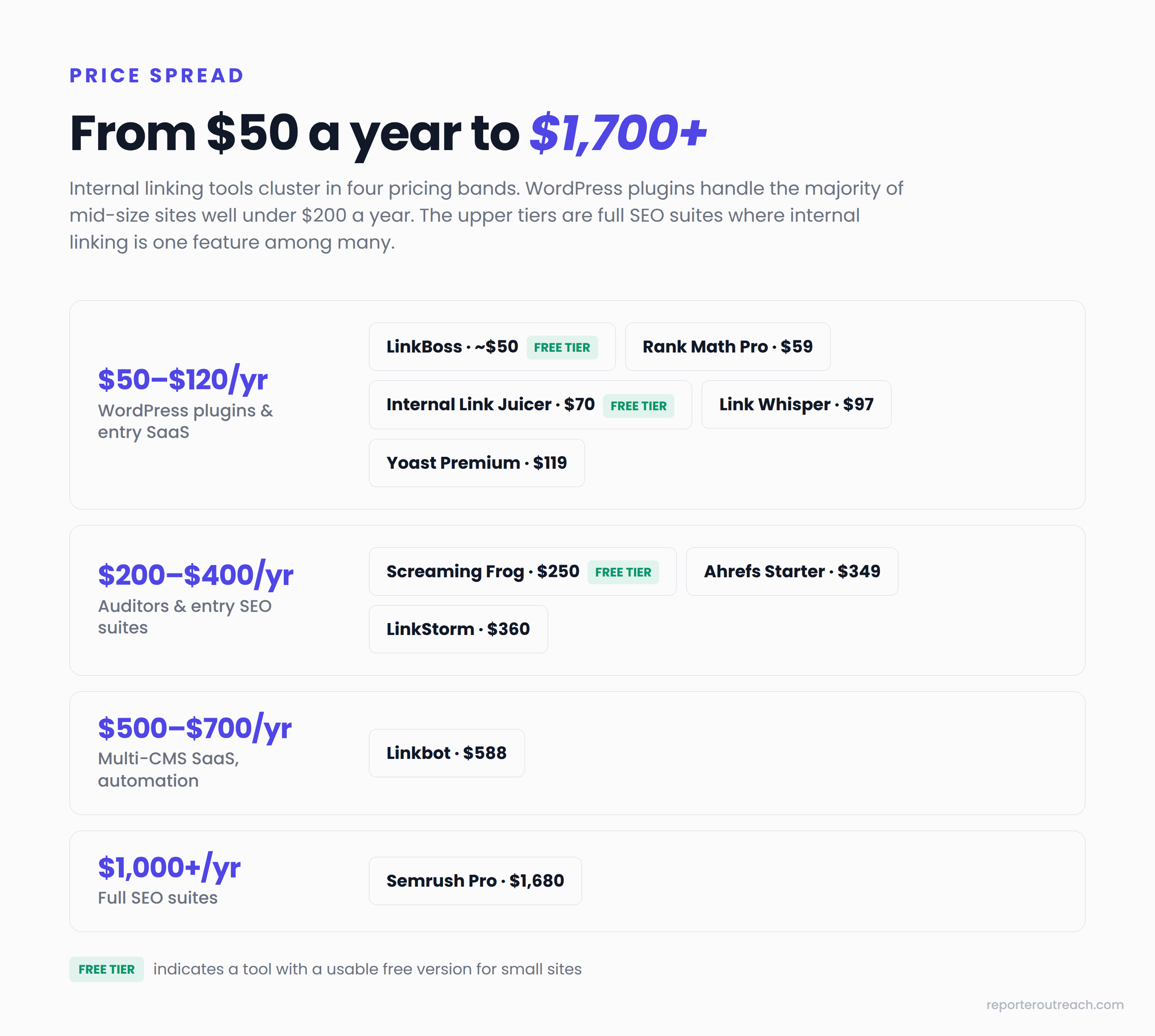
Pricing spreads across four tiers, from free options through enterprise SEO suites. The cheapest paid options sit under $120/yr and handle the majority of mid-size content sites well. Multi-CMS SaaS tools cluster in the $300–600/yr range. Broader SEO suites like Semrush sit at the top — but you're paying for the entire platform, not just internal linking.
How to Choose an Internal Linking Tool for Your Site
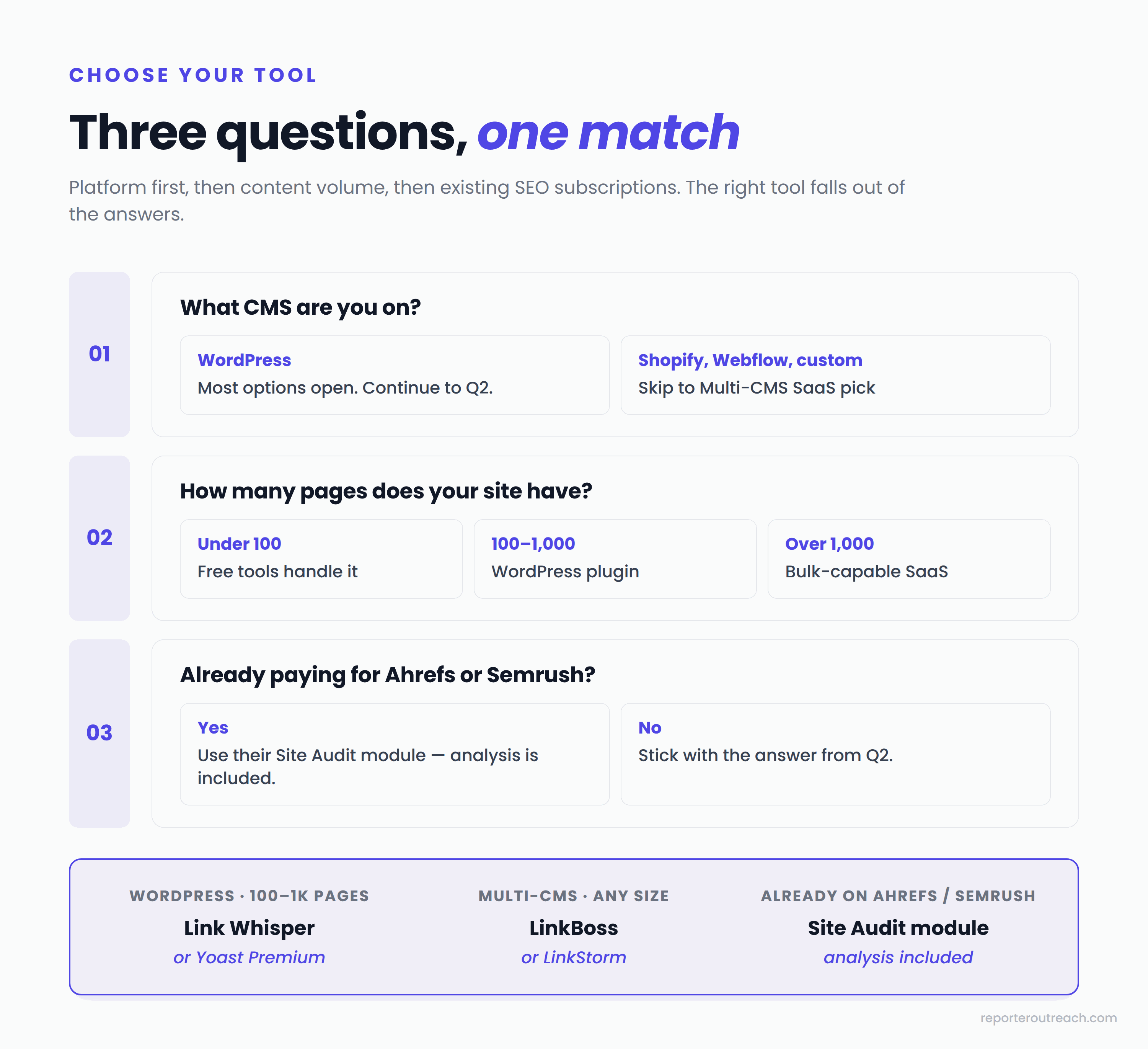
Three questions narrow the field:
1. What CMS are you on? WordPress users have the most options — Link Whisper, Yoast, Rank Math, and Internal Link Juicer all run as plugins. Anything else (Shopify, Webflow, custom builds) cuts your list to multi-CMS SaaS: LinkBoss, LinkStorm, Linkbot.
2. How many pages does your site have? Under 100 pages, you don't need a tool — you can audit and link manually in an afternoon. Between 100–1,000 pages, plugins make sense. Over 1,000 pages, you need bulk operation capability — LinkBoss or LinkStorm.
3. Are you already paying for Ahrefs or Semrush? If yes, their internal link reports may handle your audit needs without adding another subscription. You'll still need to insert the links manually, but the analysis is included.
One additional consideration once you've narrowed the category: how much automation do you want? Manual review of every suggestion (Link Whisper, Yoast) keeps quality high but takes longer. Bulk insertion with review (LinkBoss) balances speed and control. Full automation (Linkbot) is fastest but riskiest — it's a useful tie-breaker between similar tools in the same category.
What Internal Linking Tools Won't Fix
The market for internal linking tools has grown around an implicit promise: install the tool and your internal linking problem is solved. The tool finds opportunities you missed, places links, generates a dashboard. Done.
That promise is partly true. Tools genuinely do find link opportunities humans miss, and the time savings on a content site with hundreds of posts are real. But there are three problems tools don't fix, and ignoring them is the difference between a tool that helps and a tool that produces a clean dashboard while your rankings sit still.
Tools don't build authority. Internal links redistribute the authority your domain already has. They route PageRank from high-authority pages (usually your homepage and a few blog posts that earned external backlinks) to deeper pages that need a ranking boost. If your domain has no external authority to begin with, the tool can route an empty pipe across 500 internal links — and your rankings won't move. Authority comes from external editorial coverage, not from internal restructuring.
Tools don't fix structural problems. If your money pages are buried four clicks from the homepage, no internal linking tool fixes that automatically. Site architecture is a manual decision: which pages live in the navigation, which sit in the footer, which categories nest under which parents. Tools surface the symptoms (orphan pages, weak link distribution) but the structural fix is editorial work.
Tools don't replace judgment on commercial pages. Anchor text on links to your service or product pages matters — it's the strongest signal you control about what those pages should rank for. A tool's auto-link feature picking generic anchor text ("learn more," "click here") wastes the opportunity. Anchor strategy on commercial pages should be deliberate, even when the rest of your internal linking is automated. We dig into anchor strategy in our guide to contextual links.
None of this means tools aren't worth using. The right tool saves real hours and finds real opportunities. But the structural and authority work has to happen alongside the tool, not instead of it.
Internal Linking Tools FAQ
Are free internal linking tools good enough?
For sites under 100 pages, yes. The free tier of LinkBoss handles small audits, Internal Link Juicer's free version covers basic keyword-based linking, and Screaming Frog's free desktop crawler audits up to 500 URLs. Past 100 pages, paid tools earn back their cost in time saved.
Do internal linking tools work on Shopify or Webflow?
Most don't. WordPress plugins are WordPress-only by design. For Shopify, Webflow, Squarespace, or custom CMS sites, you need a multi-CMS SaaS tool — LinkBoss (WordPress and Shopify natively), LinkStorm (any CMS via crawl), or Linkbot (any platform via Google Tag Manager).
How many internal links should I have per page?
There's no fixed rule. The general guidance is 3–5 contextual internal links in the body of a typical blog post, plus whatever sits in your navigation, footer, and breadcrumbs. The constraint isn't a count — it's relevance. A page with 12 genuinely useful links beats a page with 4 forced ones.
Will an internal linking tool boost my rankings on its own?
Sometimes — but only if you have authority to redistribute. Sites with existing external backlinks see the biggest gains because the tool routes that authority more effectively to commercial pages. Sites without external authority will see modest improvements at best. Internal linking is a multiplier on what you already have, not a substitute for the link building work itself.
Should I use AI auto-linking features?
Carefully. Tools like Linkbot or LinkStorm's auto-link feature can save hours on large sites, but they introduce risk: irrelevant links, duplicate links to the same destination, generic anchor text. We recommend AI suggestions with manual review (Link Whisper, LinkBoss) over full automation for any site where ranking pages matter commercially.
Tools redistribute authority. We build it.
Internal linking tools optimize the authority you already have. If your money pages need more authority routed to them than your domain currently holds, that's a different problem.
Sources
Tool pricing and feature data verified against vendor websites in May 2026: linkwhisper.com, linkboss.io, linkstorm.io, yoast.com, ahrefs.com, semrush.com, rankmath.com, internallinkjuicer.com, screamingfrog.co.uk, linkbot.com. John Mueller's comments on internal linking from Google SEO office-hours, March 2022, documented by Search Engine Journal. WordPress market share data from W3Techs Web Technology Surveys. Related: our guide to external link building tools, how to run a link audit, the E-E-A-T checklist.