Key Takeaways
- Google Search Console is the fastest free way to check your Google ranking — it shows exact positions, clicks, and impressions for every query Google associates with your site.
- What you see when you manually search isn't what everyone sees. Location, browser history, and device all change results — so always use a dedicated rank tracker for accurate data.
- In 2026, checking rankings is only half the picture. AI Overviews and AI search engines now sit above organic results, and brands cited there often get more visibility than the #1 ranking.
- Knowing where you rank is step one. The real question is why you rank there — and that almost always comes down to authority gaps you can close with the right backlink strategy.
If you want to know how to check Google ranking, the options range from a free Search Console report to enterprise-level trackers that monitor thousands of terms daily. Which method you choose depends on whether you need a one-time snapshot or ongoing intelligence you can actually act on.
But here's what most ranking guides won't tell you: the data itself is almost useless without context. We've worked with hundreds of businesses that check their rankings religiously — and the ones who actually improve aren't tracking more keywords. They're asking better questions about what the data means.
This guide covers every practical method for checking positions, explains why your manual searches are lying to you, and shows you how to turn ranking data into decisions that move the needle.
How to Check Google Ranking: 3 Methods
1. Google Search Console (free, most reliable)
Search Console is Google's own tool, and it's the single best free resource for checking where your site appears. The Performance report shows every query Google associates with your pages — along with clicks, impressions, CTR, and average position. You can filter by date range, device, country, and specific URLs.
If you haven't set it up yet, go to search.google.com/search-console and verify your site. Takes five minutes and gives you data no other free tool provides.
The limitation: You can only see your own site's data. No competitor intelligence, no SERP feature analysis, no way to see what's happening across your industry. For that, you need a dedicated tracker.
2. Rank tracker tools (Ahrefs, Semrush, and others)
A rank tracker lets you monitor positions for any domain — yours and your competitors' — with daily or weekly updates. The two industry standards:
Ahrefs ($29–$449/mo) is what most SEO professionals use. The Rank Tracker lets you monitor hundreds of keywords with daily updates, see AI Overview detection, and compare against competitors side by side. Their free Keyword Rank Checker handles quick one-off lookups.
Semrush ($139–$499/mo) does essentially the same thing with a different interface. It adds an algorithm sensor that helps you distinguish between changes caused by your own work and broader Google updates — which saves a lot of unnecessary panic.
For smaller budgets, Ubersuggest, SE Ranking, and Mangools all offer rank tracking at lower price points. They're fine for basic monitoring, but you'll outgrow them fast if you're serious about competitive analysis.
3. Manual check (incognito window)
Open an incognito window, type in your keyword, and scroll until you find your page. Simple.
Also unreliable. Even in incognito mode, Google still personalizes based on your IP location. Someone searching the same phrase in Chicago will see a different page than someone in Dallas. It's fine for a quick visual check — seeing what ads, featured snippets, or AI Overviews appear — but don't base any strategy decisions on it.
Append &gl=us&hl=en to any Google search URL to force U.S. English results regardless of where you are. Useful for comparing how results look in different regions — but still not as accurate as a dedicated tracker.
| Method | Cost | Best for | Main limitation |
|---|---|---|---|
| Search Console | Free | Exact data on your own site — clicks, impressions, position | No competitor visibility |
| Ahrefs / Semrush | $29–$499/mo | Competitor tracking, AI Overview detection, SERP feature analysis | Cost; learning curve |
| Incognito window | Free | Quick visual check of SERP layout | Location-biased; no historical data |
Why Your Manual Search Results Are Lying to You
This is the mistake almost everyone makes. You type your keyword into Google, see your site on page one, and think you're ranking well. You might not be.
Google personalizes results based on at least four factors — and even incognito mode only removes one of them.
- Location. Your IP address determines what Google shows, especially for anything with local intent. "SEO agency" returns completely different results in San Diego versus New York. If you serve national clients, you need to check from multiple locations — which no manual search can do efficiently. (Still active in incognito.)
- Search history and account. When you're signed into Google, your past clicks and browsing behavior influence what appears. You'll tend to see your own site ranked higher than it actually appears for first-time visitors. This creates a dangerous false confidence. (Removed in incognito.)
- Device. Mobile and desktop return different results. Google maintains separate indexes and weighs mobile performance factors like load speed and responsive design. If most of your audience is on phones — and for most businesses it is — you need to be checking mobile positions specifically. (Still active in incognito.)
- SERP features. Even when your organic position hasn't moved, your actual visibility can tank overnight. A new AI Overview, an expanded ad block, a video carousel, a "People Also Ask" section — all of these push organic results further down the page. Position #3 in 2024 occupied prime real estate. Position #3 in 2026, with an AI Overview and four ads above it, might be below the fold entirely. (Varies by query in real time.)
For anything beyond a casual spot-check, use a tool. It removes all personalization variables and gives you consistent, comparable data over time. Trust the tool over what you see in your browser.
AI Visibility Is the New Ranking
This is the part most ranking guides skip entirely — and it's arguably more important than traditional positions in 2026.
AI Overviews now appear on a significant share of Google searches and sit above every organic result, above every ad. When your brand is cited in an AI Overview, you're getting visibility that even a #1 ranking can't match.

And it's not just Google. ChatGPT, Perplexity, and Gemini all recommend brands and cite sources when users ask buying-intent questions. If someone asks "what's the best project management tool for remote teams?" and your competitor gets mentioned but you don't — that's a visibility gap no amount of keyword optimization can fix.
How to check your AI visibility
In Google: Both Ahrefs and Semrush now flag which of your tracked keywords trigger AI Overviews and whether your content is cited. For a manual check, search your target terms in incognito and look for the AI Overview panel at the top.
In AI chatbots: Ask ChatGPT, Perplexity, and Gemini the exact questions your potential customers would ask. "What are the best [your category] tools?" "How do I solve [problem your product fixes]?" Do this monthly for your top 10–15 terms and track whether you're mentioned.
The factor that most strongly predicts AI visibility? Editorial mentions across trusted publications. Not keyword density. Not technical SEO. Brand presence in authoritative media is what AI models use to determine which businesses to cite — which makes digital PR link building the most effective lever for both traditional and AI-powered search. Our GEO guide breaks down the full strategy.
What Most Rank Checks Actually Miss
Here's what we see constantly after working with 500+ clients on link building campaigns: businesses obsess over tracking rankings but never ask the question that actually matters.
Why are you stuck where you are?
The answer, in the vast majority of cases, is an authority gap. Your content is relevant — Google already recognizes that by putting you on page one or two. But you don't have enough quality backlinks from authoritative domains to outrank the sites above you. Pull whoever ranks #1–3 for your target keyword, compare their referring domain count and average domain rating to yours, and that gap is your answer.
Most tracking tools make this easy. In Ahrefs, the "Competing Domains" report compares backlink profiles side by side. You'll almost always see a pattern: the sites outranking you have 2–5x more referring domains from DR 50+ sources.
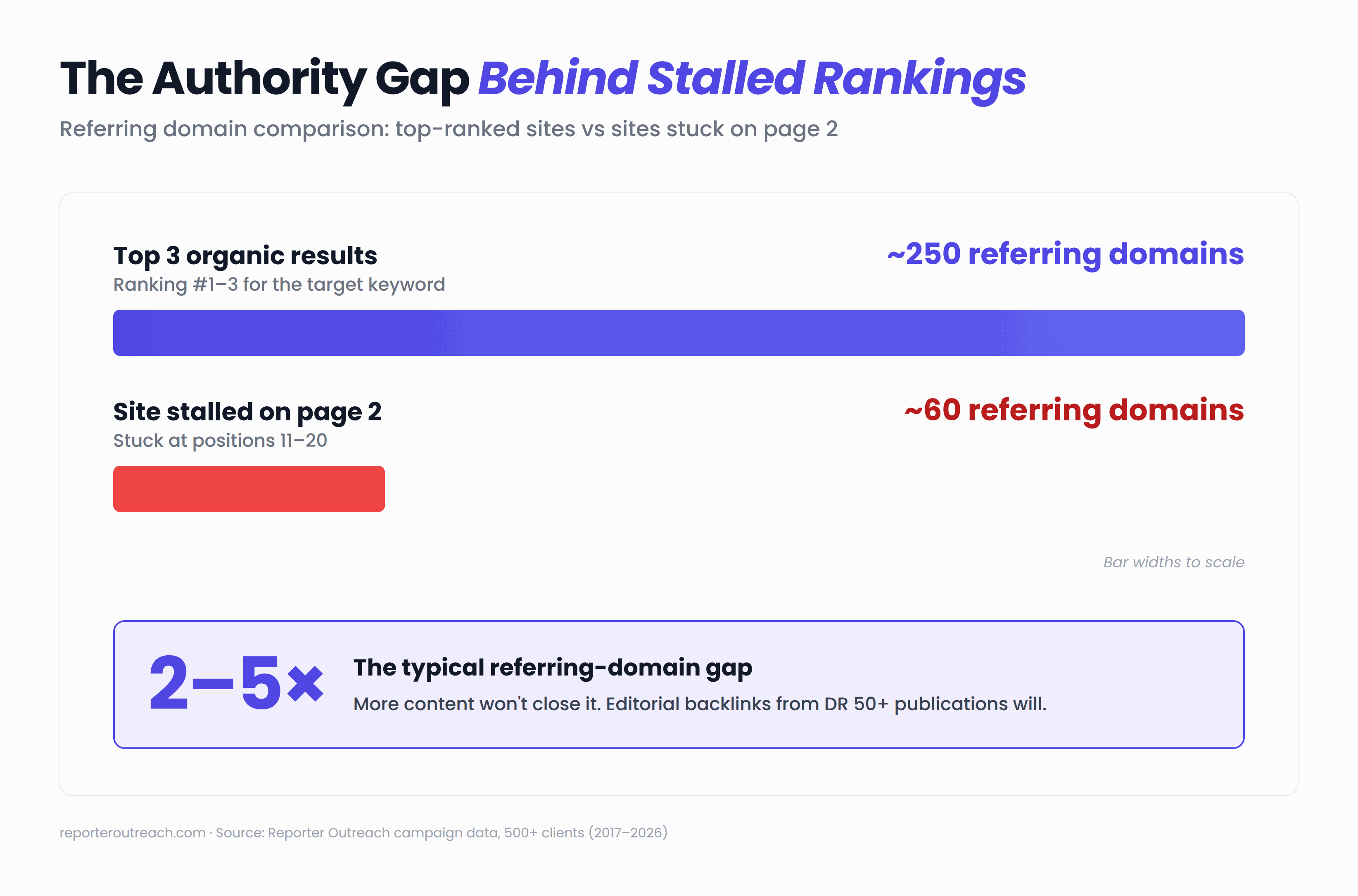
We had a SaaS client spending $2,000/month on content creation — publishing two articles per week — while their three main competitors each had 150+ more referring domains. No amount of content was going to close that gap. Once they shifted budget toward editorial link placements, the rankings they'd been chasing for months started moving within 90 days.
Tracking rankings without building authority is like checking the scoreboard without playing the game. If you've been monitoring the same keywords for six months and nothing's moving, the data isn't the problem — the backlink profile is.
What to Do With Your Data
Rank tracking is only useful if you know how to respond to what it tells you. Here are the scenarios we see most often and what they actually mean:
| Pattern | What it usually means | What to do |
|---|---|---|
| Stuck at positions 11–20 | Authority gap. Content is relevant; backlinks are the bottleneck. | Build targeted editorial links from DR 70+ publications. This is where digital PR and niche edits deliver the highest ROI. |
| Sudden 10+ position drop | Technical or algorithmic issue, not a content problem. | Check Search Console for manual actions, compare timing against known core updates, audit redirects/noindex tags, check for lost referring domains. |
| Good position, low CTR | Listing problem, not a ranking problem. | Rewrite the title tag and meta description. Add schema markup for rich snippets if competitors have them and you don't. |
| Not appearing in AI Overviews | Brand authority gap. AI cites brands with editorial presence, not optimized content alone. | Optimize content to give clear answers in opening paragraphs. Invest in media coverage that signals authority to both Google and the LLMs powering AI search. |
Case Study: From Ranking Data to Results
Here's what this looks like in practice.
Qooper, a SaaS mentoring platform, was stuck in positions 15–30 for their highest-value keywords. Their content was solid — well-written, properly optimized, targeting the right terms. But a competitor backlink analysis revealed the gap: the sites outranking them had significantly more referring domains from high-authority publications.
The strategy was straightforward. Instead of publishing more content (which they'd been doing for months), they focused on earning editorial backlinks through digital PR — getting featured as expert sources in publications their competitors were also appearing in. Within six months, the rankings they'd been chasing started moving and organic traffic compounded into multiples of where they'd started. Full numbers are in our case study writeup.
The takeaway: ranking data told them where they stood. Competitor analysis told them why. And a focused authority-building strategy closed the gap. The tools matter less than the decisions you make with the data they provide.
Know Where You Rank. Now Close the Gap.
We build the editorial backlinks that move you from page two to page one — in both Google and AI search results.
Frequently Asked Questions
How do I check my Google ranking for free?
Set up Google Search Console — it's free, takes five minutes, and shows every query Google associates with your site. You'll see your average position, click data, and which pages appear for which terms. For a quick one-off check, search in an incognito window (keeping in mind location still affects results). Ahrefs also offers a limited free rank checker for individual keyword lookups.
Why does my ranking look different from what a tool shows?
Google customizes results based on your location, browsing history, device, and whether you're signed into your account. When you search manually, you're seeing a version of Google tailored specifically to you — which often inflates where you think you rank. A tracker strips away those variables and shows neutral, consistent positions you can compare over time.
How often should I check my rankings?
Weekly for your most important commercial keywords. Monthly for your broader keyword set. Checking daily is counterproductive — positions fluctuate naturally, and obsessing over daily movement leads to reactive decisions rather than strategic thinking. Set up automated alerts for significant drops and review trends weekly.
How do I check if my site appears in AI Overviews?
The quickest manual method: search your keywords in a private browser window and check whether Google displays the AI-generated summary panel above organic results. For tracking at scale, both Ahrefs and Semrush flag AI Overview triggers in their dashboards automatically. For ChatGPT, Perplexity, and Gemini visibility, test your top keywords monthly by asking those platforms directly.
What's a realistic ranking goal?
Aim for the top 10 as a baseline, top 3 if you want meaningful click volume. But the keyword matters more than the position — ranking #5 for a high-intent term with real search volume is far more valuable than #1 for something nobody actually searches. Focus your tracking on terms that connect to revenue, not vanity metrics.
My rankings haven't moved in months. What's wrong?
Stalled positions almost always point to an authority gap rather than a content problem. Compare your backlink profile against whoever holds the top three spots — you'll likely find they have significantly more referring domains from quality sources. Closing that gap with editorial link placements is what moves the needle, not more blog posts or on-page tweaks.
Sources
- Reporter Outreach campaign data — 500+ clients, 25,000+ placements (2017–2026)
- Ahrefs published pricing — ahrefs.com/pricing (verified April 2026)
- Semrush published pricing — semrush.com/pricing (verified April 2026)